Pod Scheduling (Beta) Available in v1.30.20+
Pod Scheduling finds workloads whose scheduling constraints keep underutilized nodes from scaling down, and safely relaxes those constraints while preserving availability, so the node autoscaler can consolidate pods onto fewer nodes and lower cost.
How scheduling constraints block scale-down
Workloads often use self pod anti-affinity to spread their replicas across nodes for high availability — for example, requiring that no two replicas run on the same host. Others restrict where they can run using node affinity, node selectors, or topology spread constraints.
These constraints exist to keep workloads available, but they often guard against more risk than the workload faces in practice. Requiring each replica on a separate node prevents the autoscaler from consolidating replicas to drain a node, leaving underutilized nodes running purely to satisfy the rule — and paying for capacity that goes unused.
How it works
ScaleOps analyzes each workload’s scheduling constraints and detects self anti-affinity rules that can be relaxed while maintaining availability. Instead of pinning every replica to its own node, it keeps replicas spread across a configurable minimum number of nodes, so the autoscaler can consolidate the remaining replicas and scale down the freed nodes.
The optimization is:
- Policy-driven — controlled per workload by a policy.
- Safe — replicas stay spread across a minimum number of nodes, and zone-level spreading can be guaranteed.
The Pod Scheduling page
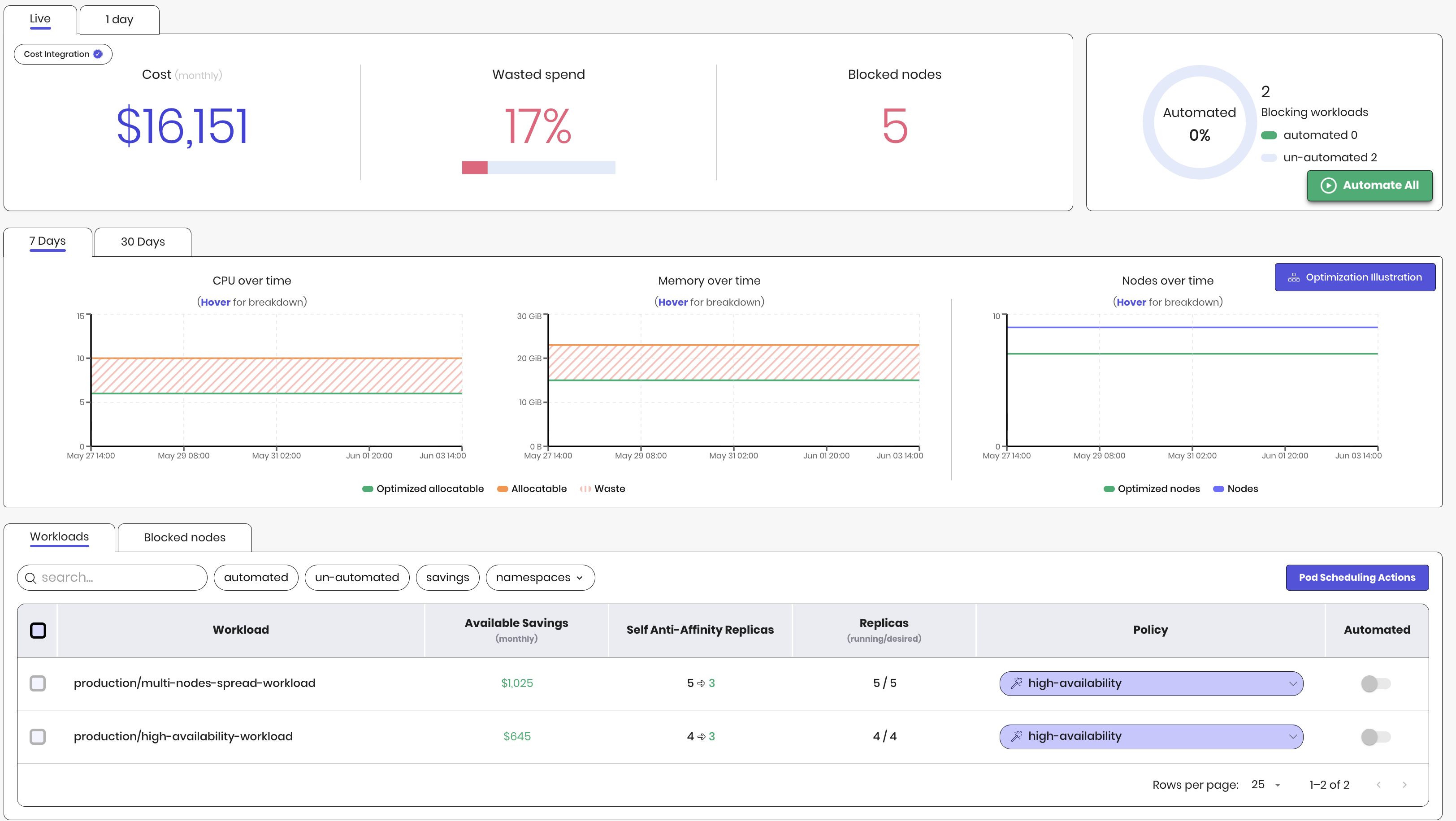
The page shows summary metrics and resource graphs, followed by a single Workloads table:
- Summary metrics — monthly cluster cost, wasted spend, the number of blocked nodes, and the share of blocking workloads already automated.
- Resource graphs — CPU, memory, and node count over time, so you can track nodes scaling down as optimization is applied.
- Workloads table — every workload whose scheduling constraints block node scale-down.
Workloads table
The table includes the following columns:
| Column | Description |
|---|---|
| Workload | The workload whose constraints block scale-down. |
| Available Savings | Estimated monthly savings once the workload’s anti-affinity is relaxed and the blocked nodes scale down. |
| Self Anti-Affinity Replicas | Replicas pinned by self anti-affinity, shown before and after automation. |
| Replicas | The workload’s running / desired replica count. |
| Policy | The policy that controls the optimization configuration. |
| Automated | Whether automation is enabled for the workload. |
Scheduling concerns
Each workload is labeled with the constraint(s) that block its nodes from scaling down:
- Pod anti-affinity — self pod anti-affinity.
- Node affinity —
nodeAffinityrules. - Node selector —
nodeSelectorconstraints. - Topology spread — topology spread constraints.
ScaleOps relaxes only self anti-affinity automatically. Other constraints — node affinity, node selectors, and topology spread — are not changed, since they usually reflect an intentional placement requirement.
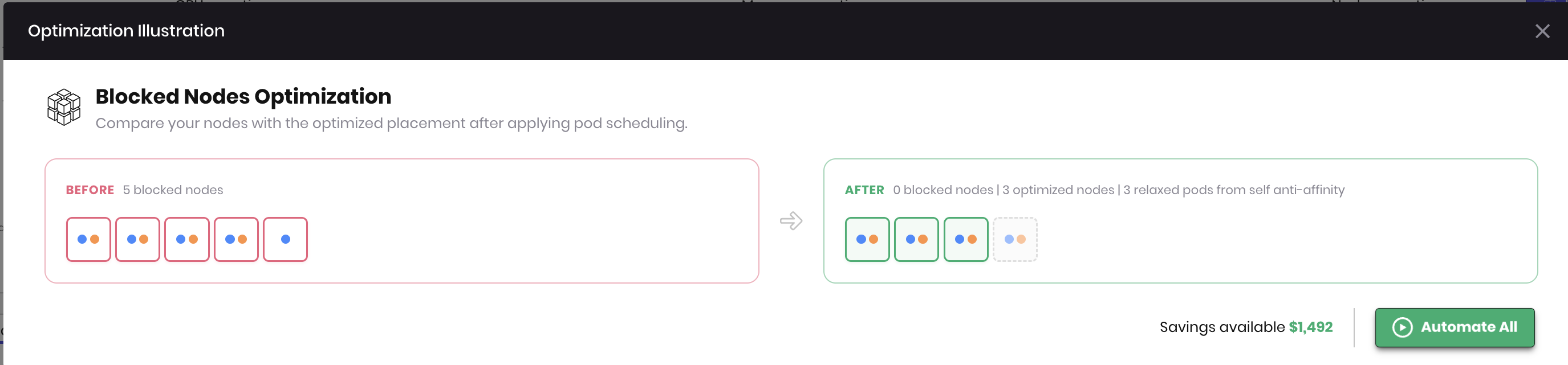
Click Optimization Illustration to compare your nodes before and after pod scheduling optimization — how many are blocked today versus the optimized placement, and how many pods would be relaxed from self anti-affinity.
Enabling automation
Turn on the Automated toggle for a workload to let ScaleOps relax its anti-affinity, or use Automate All to enable it for every eligible workload at once. Automation always keeps a configurable minimum number of available replicas, so availability is not reduced below the threshold you set.
Once a workload is automated, ScaleOps relaxes its anti-affinity, the blocked nodes become eligible for consolidation, and the autoscaler scales them down — realizing the savings shown in the table.
Scheduling tab
To open the Scheduling tab, click a workload row in the table to open the Workload overview, then select the Scheduling tab.
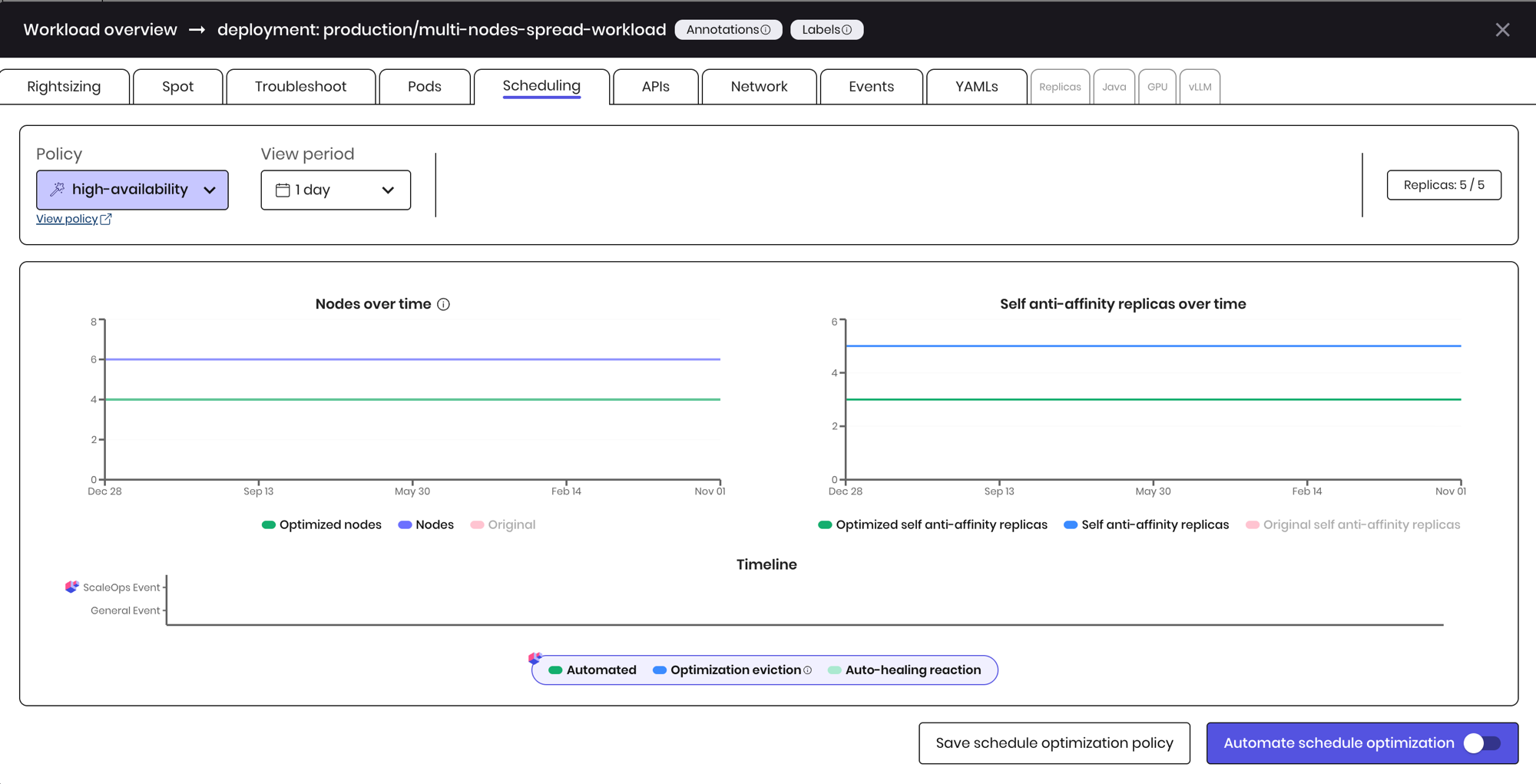
This tab shows how ScaleOps optimizes the workload’s placement over time:
- Nodes over time — the number of nodes the workload spreads across.
- Self anti-affinity replicas over time — original vs. optimized self–anti-affinity replicas, showing how ScaleOps relaxes overly strict spreading constraints.
- Timeline — scheduling events over time, including automated actions, optimization evictions, and auto-healing reactions.
Policies and configuration
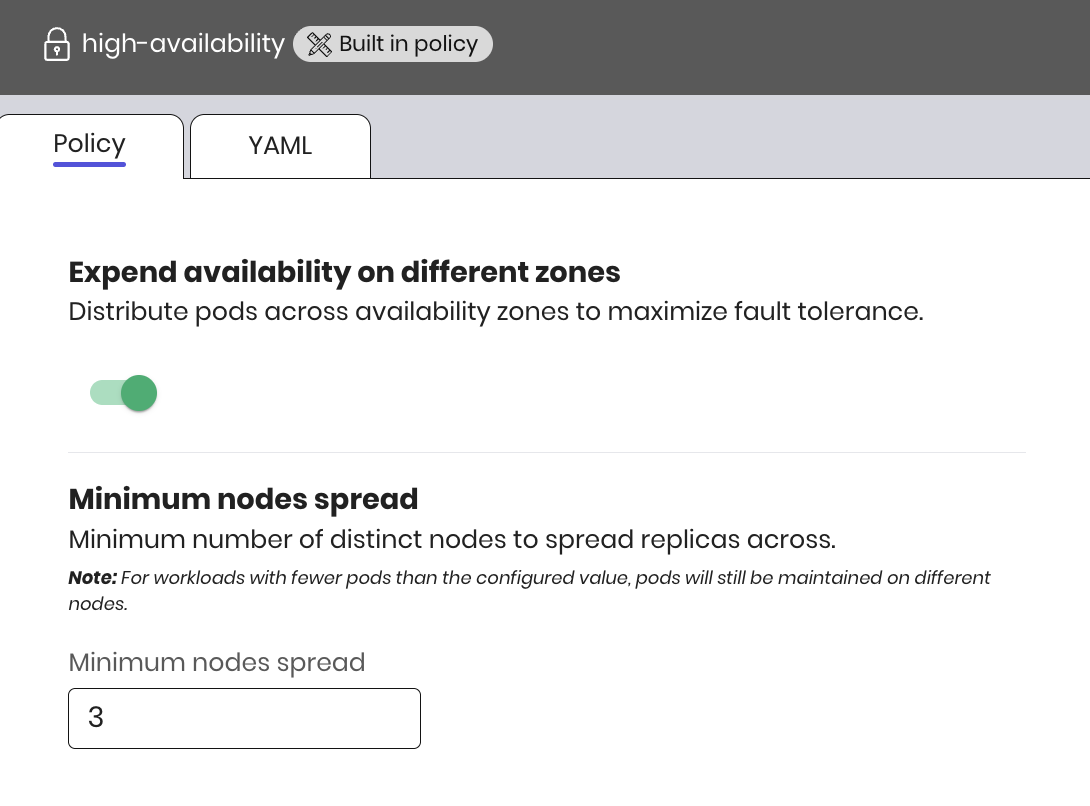
Pod Scheduling is controlled by a policy attached to each workload. The policy exposes the following settings:
| Field | Type | Description |
|---|---|---|
enabled | boolean | Enables self anti-affinity optimization for the workload. |
minimumNodesSpread | integer | The minimum number of nodes to keep replicas spread across. For example, 3 keeps replicas spread across at least three nodes. |
enhanceAvailabilityOnDifferentZones | boolean | Spreads replicas across zones for higher availability while still allowing consolidation. |
For GitOps-managed clusters, define the policy declaratively:
apiVersion: analysis.scaleops.sh/v1alpha1
kind: PodSchedulingPolicy
metadata:
  name: relax-anti-affinity
  namespace: my-namespace
spec:
  selfAntiAffinityOptimization:
    enabled: true
    minimumNodesSpread: 3
    enhanceAvailabilityOnDifferentZones: true
Notes and related
- Supported workload types: Pod Scheduling currently supports Deployments only.
- Un-Evictable — bin-packing for un-evictable pods.
- Node Management — how ScaleOps consolidates and scales down nodes once they are unblocked.