Custom Workloads
To see supported workloads, please refer to the Workload page.
ScaleOps supports identifying and automating any custom workload type based on unique identifiers on the workload pods.
Using the dedicated custom-owner-grouping CRD ScaleOps identifies and aggregates usage data across multiple pods of any custom workload into a single recommendation.
The custom owner is identified and displayed in ScaleOps as a unique type, across the platform and in the Custom Workloads page.
Agent Sandbox Available in v1.32.8+
The Agent Sandbox is a built-in custom workload grouping that automatically identifies and groups agent sandbox workloads. Once detected, resource optimization applies immediately without requiring any manual configuration.
Custom Workloads Page Available in v1.15.13+
The Custom Workloads page is dedicated to managing custom workloads. Use this page to explore, create, edit, and delete custom workloads.
Afterward, the custom workload instances can be optimized like any other supported workload type within the platform.
Explore Unrecognized Workloads
In the Unrecognized CPU and Memory graphs, pods that are not yet recognized as workloads are shown, broken down by the pods’ owner type.
Pods without an owner are grouped under the Ownerless category.

The Unrecognized Types table, aggregated by pods’ owner type, allows exploration of pod characteristics—such as labels, annotations, owner types, and images—by selecting a row. Use this information to plan the appropriate custom workload configuration.

Create and Edit Custom Workloads
The Custom Workloads table provides the ability to view, create, and edit custom workload configurations. Each custom workload displays the number of recognized workloads and associated resources, along with the defined default policy and automation state. Clicking the Explore Workloads button navigates to the workloads rightsizing page, where instances associated with the custom workload can be explored.

When creating or editing a custom workload, the following fields are available:
- Custom workload name (required)
- Default policy and automation state (optional)
- Rules to identify and group the custom workload (required)
Custom Workload Rules
Custom workloads are identified based on labels, annotations, owner types, and images,
and are grouped according to the Rule’s Group By values detected on the pods across the cluster.
Within a Rule, multiple Group By elements function as an AND operator.
Different Rules are evaluated using an OR operator.

Examples:
- If two pods share the label key
app, where one pod has the labelapp: app1and the other hasapp: app2, and the Rule’sGroup Byis configured based on theapplabel, the platform creates two instances for this custom workload one for each pod. All pods with the sameapplabel value will be grouped together, pods without theapplabel won’t be grouped into this custom workload.

- If we’ll add one more Group By in the same Rule, for the annotation key
team/a, the custom workload instances will be created only for workloads with both labelappand annotationteam/a, and grouped by both values. For example, if one pod has the labelapp: app1and the annotationteam/a: team1, and the other pod has the labelapp: app1and the annotationteam/a: team2, the platform will create two instances for this custom workload, one for each pod, because the different annotation value.

For more advanced use cases, including regex matching and additional configurations, refer to the Writing a Custom Owner Grouping Spec section.
Simulation
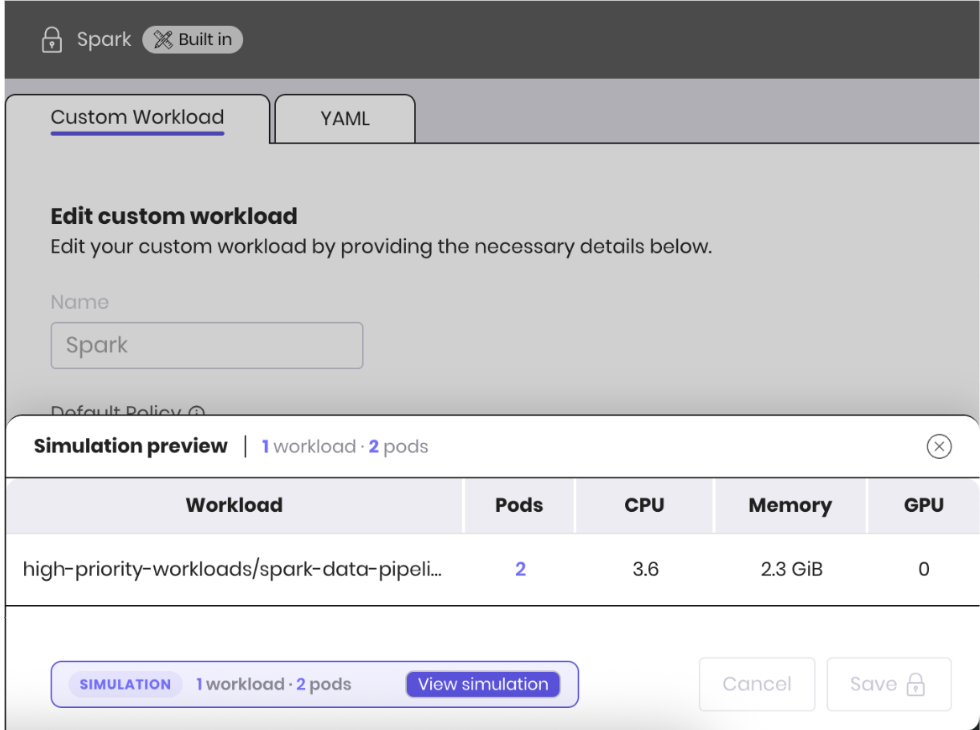
When creating or editing a custom workload through the UI, ScaleOps automatically runs a simulation in the background to preview which workloads and pods would be matched by the current rule configuration — before saving any changes. This is available only when using the UI, not when applying YAML directly.
The simulation result is shown at the bottom of the form, displaying the number of matched workloads and pods. Click View simulation to open a detailed breakdown of the matched workloads and pods.
This allows you to validate your grouping rules and fine-tune them before applying them to the cluster.
Advanced: Creating a Custom Owner Grouping CR
The following is an example of a Custom Owner Grouping resource.
apiVersion: analysis.scaleops.sh/v1alpha1
kind: CustomOwnerGrouping
metadata:
  name: operator
  namespace: scaleops-system
spec:
  groupBys:
   - labels:
     - role
     - app-name
In this example:
- A Custom Owner Grouping resource is created, This name (specified in the .metadata.name field) will identify the custom workload types. See Writing a Custom Owner Grouping Spec for more details.
- The .spec.groupBys field defines by which common fields Pods are grouped together. In this case, Pods that share the same values of the specified labels (app-name, role) will be grouped together. However, more sophisticated selection rules are possible, as long as the Pod template itself satisfies the rule.
How to use
- Create a new CustomOwnerGrouping object.
kubectl apply -f custom-owner-grouping-operator.yaml- Run
kubectl get customownergrouping -n scaleops-systemto check if the Custom Owner Grouping was created. The output is similar to the following:
NAME          AGE
flink         3d14h
flinkapache   3d14h
operator      30s
raycluster    3d14h
spark         3d14h
vertex 3d14h- Run
kubectl get pods -n <namespace> <pod> -o yamlto check if the pods are annotated with the custom owner identifier. The output is similar to the following (note the annotations and labels):
apiVersion: v1
kind: Pod
metadata:
  annotations:
    scaleops.sh/pod-owner-grouping: operator
    scaleops.sh/pod-owner-identifier: master-training-184e24fd1e
  labels:
    role: master
    app-name: training
    scaleops.sh/pod-owner-grouping: operator
    scaleops.sh/pod-owner-identifier: master-training-184e24fd1e
  name: operator-fam-b-1
  namespace: default
...
Writing a Custom Owner Grouping Spec
groupBys
Contains a list of identifiers that are used to group Pods into a single recommendation. Each item in the list defines a unique set of identifiers. The items in the list have an OR semantic between them, and AND semantic within each item.
labels
List of label regex that will be used to identify and categorize Pods by unique values. For example, for pod label application: collector-front and the list item application, the unique value is collector-front. For the same pod label with the list item application: collector-, the unique value is front.
excludeLabels
List of label regex that will be used to exclude Pods from the grouping. If a label from this list is found as a match, the pod will be excluded from this groupBy match, but can be matched by other groupBys of the same COG.
annotations
List of annotation regex that will be used to identify and categorize Pods by unique values.
excludeAnnotations
List of annotation regex that will be used to exclude Pods from the grouping. If an annotation from this list is found as a match, the pod will be excluded from this groupBy match, but can be matched by other groupBys of the same COG.
images
List of image regex that will be used to identify and categorize Pods by unique values.
positiveRegexMatch
Specifies if we should look for a regex selection match. If set to true, we concatenate all matches to the unique values. Otherwise, we look for the regex in a label and take the rest of the string as the unique value.
This parameter also affects the excludeLabels and excludeAnnotations parameters. If set to true, the regex will be RE2 regex and will exclude on any match. If set to false, a pod will be excluded if it has a label or annotation that starts with one of the values in this list.
When used with containerNames, setting positiveRegexMatch: true groups containers by their regex match groups. For example:
kind: CustomOwnerGrouping
apiVersion: analysis.scaleops.sh/v1alpha1
metadata:
  name: pipeline-positive
  namespace: scaleops-system
spec:
  groupBys:
    - labels:
        - goodlabel
      containerNames:
        - "(example|scaleops)-.*"
      positiveRegexMatch: true
  displayOptions:
    hideGeneratedSuffix: true
  defaultPolicy: production
  defaultAuto: true
In the example above all example-.* containers will be grouped into the same recommendations while scaleops-.* will be grouped into a separate recommendation.
topOwnerController
Specifies the top owner controller that will be used to identify and categorize Pods by this owner name. You can specify only kind, and the pods will be grouped by owner names. If name is also specified, it should contain regex indicating the desired unique value selection. For example, for the selection regex ^(.*)-.+$ and the owner name abc-123-ccc, the unique value is abc-123.
containerNames Available in v1.29.9+
List of RE2 regex patterns used to match container names within a pod. All containers that fall under the same regex pattern will be shown in the container dropdown in the workload overview as a single unified container option.
Logical meaning: When container name regex patterns are added to the custom workload definition, all containers that match a given pattern are considered as one logical container. This allows ScaleOps to generate and transfer recommendations across pods whose containers share the same logical role but have dynamic, auto-generated names.
Constraints:
containerNamescannot be the sole group by element in a rule.- A pod with multiple containers that match the same regex pattern will not be grouped into the custom workload. Each regex must match exactly one container per pod.
Example
Assume two Job pods share the label goodlabel: good. Each pod has two containers with dynamic names:
Job A pod:
apiVersion: batch/v1
kind: Job
metadata:
  name: pipeline-run-001
spec:
  template:
    metadata:
      labels:
        goodlabel: good
    spec:
      containers:
        - name: worker-3
          image: my-app:latest
          resources:
            requests:
              cpu: 500m
              memory: 512Mi
        - name: scaleops-7821-day-monday
          image: sidecar:latest
          resources:
            requests:
              cpu: 100m
              memory: 128Mi
Job B pod:
apiVersion: batch/v1
kind: Job
metadata:
  name: pipeline-run-002
spec:
  template:
    metadata:
      labels:
        goodlabel: good
    spec:
      containers:
        - name: worker-17
          image: my-app:latest
          resources:
            requests:
              cpu: 500m
              memory: 512Mi
        - name: scaleops-1234-day-friday
          image: sidecar:latest
          resources:
            requests:
              cpu: 100m
              memory: 128Mi
Without dynamic container matching:
worker-3≠worker-17scaleops-7821-day-monday≠scaleops-1234-day-friday
As a result, pods will not be optimized upon creation because no recommendation exists for these container names yet.
The following COG configuration resolves this by matching both container names dynamically:
kind: CustomOwnerGrouping
apiVersion: analysis.scaleops.sh/v1alpha1
metadata:
  name: pipelineworkers
  namespace: scaleops-system
spec:
  groupBys:
    - labels:
        - goodlabel
      containerNames:
        - "worker-[0-9]+"
        - "scaleops-\\d+-day-.*"
  displayOptions:
    hideGeneratedSuffix: true
  defaultPolicy: production
  defaultAuto: true
This COG matches pods that:
- Have the label
goodlabel(any value). - Have containers matching at least one of the two regex patterns.
When Job B spawns, its containers will receive the recommendation calculated for Job A’s equivalent containers.
originResource
When set to true, pods are additionally grouped by their original resource requests (CPU and memory, before ScaleOps applies recommendations). This creates separate workload instances for pods with different original resource configurations, even if they share the same labels or annotations.
recommendationRetentionPeriodMinutes
Specifies the retention period for the recommendations created by this Custom Owner Grouping. The default value is 1 week. After this period, the recommendations will be deleted if no pods were detected.
displayOptions
Specifies the display options for the recommendations created by this Custom Owner Grouping.
hideGeneratedSuffix
Specifies if the generated suffix should be hidden in the UI. The default value is false.
fields
List of fields that will be used as the display name for the group. Possible values are: labels, annotations, ownerAPIVersion, ownerKind, ownerName. If not specified, the group display name will be generated based on all fields. If specified but not found in the group, it will be ignored. When using labels or annotations in displayOptions.fields with more than one label or annotation in the groupBys, the names will be ordered alphabetically.
defaultPolicy
Specifies the default policy that will be assigned to the recommendations created by this Custom Owner Grouping. AutomatedNamespace takes precedence over this if it exists.
defaultAuto
If set to true, recommendations created by this Custom Owner Grouping will be toggled on by default. Like defaultPolicy, defaultAuto will be overridden by the AutomatedNamespace CRD if it exists, or by default-auto annotations.
defaultGpuPolicy
Specifies the default GPU policy that will be assigned to the recommendations created by this Custom Owner Grouping, mirroring defaultPolicy for GPU Rightsizing. This setting only applies to workloads that request a GPU.
The AutomatedNamespace defaultGpuPolicy and the workload- or namespace-level scaleops.sh/default-gpu-policy annotation both take precedence over this field. When neither is set, this COG default is applied; if this field is also unset, the workload falls back to its smart policy or the system default GPU policy.
defaultGpuAuto
If set to true, recommendations created by this Custom Owner Grouping will have GPU automation toggled on by default, mirroring defaultAuto for GPU Rightsizing. This setting only applies to workloads that request a GPU.
Like defaultGpuPolicy, defaultGpuAuto is overridden by the AutomatedNamespace CRD’s gpuOptimize field if it exists, or by the workload- or namespace-level scaleops.sh/default-gpu-auto annotation.
weight
Assign a weight to prioritize COGs when multiple matches occur. Selection logic is driven by the following priority: Custom COGs are always preferred over built-ins, weight is used as a secondary sorting (higher weight = higher priority), and tertiary sorting is alphabetical by COG name.
Cross-Namespace Grouping Available in v1.32.11+
By default, grouping is scoped to a single namespace: pods that share the same groupBys values but run in different namespaces form a separate workload instance per namespace, and each instance learns usage only from the pods in its own namespace.
Adding the scaleops.sh/cross-namespace-grouping: "true" label to a Custom Owner Grouping pools matching pods across all namespaces into a single group that learns usage together:
apiVersion: analysis.scaleops.sh/v1alpha1
kind: CustomOwnerGrouping
metadata:
  name: operator
  namespace: scaleops-system
  labels:
    scaleops.sh/cross-namespace-grouping: "true"
spec:
  groupBys:
    - labels:
        - goodlabel
When cross-namespace grouping is enabled for a custom workload:
- Every instance of the group learns from the pooled usage of the group’s pods across all namespaces, instead of only the pods in its own namespace.
- Each namespace still gets its own workload instance, and each instance’s recommendation is calculated independently. Policy and automation are resolved per namespace as usual — the AutomatedNamespace CRD, namespace annotations, and the COG’s
defaultPolicy/defaultAutoapply to each instance independently. - When the group’s first pod starts in a namespace that has no instance yet, it is optimized immediately at pod creation using what the group has already learned — there is no learning period in the new namespace.
This is most valuable for workloads that run identical pods in many namespaces — for example per-team, per-environment, or short-lived per-run namespaces — where each namespace alone provides too little usage history for a confident recommendation, or is deleted before one is learned.
How it works
After configuring the groupBys rules appropriately, ScaleOps will automatically identify pods that match the configuration and annotate them with the custom owner details. Pods with identical values for the keys defined in the spec.groupBys, will be identified as part of the same group. Recommendations will be created for the annotated pods.
Validations
Currently, there are some validations that are being done that should be enforced by the user. These validations are:
- All Custom Owner Grouping objects must be created in the ScaleOps installation namespace (
scaleops-systemby default). - Object name should not contain any dashes (’-’).
- Each
groupBysitem has at least one of: labels, annotations, topOwnerController, images.groupBysthat only contain exclusions will also be allowed, but will have no effect on the grouping, as they won’t affect othergroupBys.
- Field
topOwnerControllerhas self.kind field which is not empty.
CR’s that do not pass these validations will not be applied on any pod.
Examples
apiVersion: analysis.scaleops.sh/v1alpha1
kind: CustomOwnerGrouping
metadata:
  name: vertex
  namespace: scaleops-system
spec:
  groupBys:
  - topOwnerController:
      kind: Vertex
For the example above, ScaleOps will identify pods owned by a ‘Vertex’ object and group them by the Vertex name.
Hence, ScaleOps creates multiple vertex recommendations (or groupings) for each unique set of values found on pods, matching different applications and usages.
apiVersion: analysis.scaleops.sh/v1alpha1
kind: CustomOwnerGrouping
metadata:
  name: jenkinsjob
  namespace: scaleops-system
spec:
  groupBys:
  - labels:
    - "^(jenkins/label:).*"
    excludeLabels:
    - "^(helm.sh/chart).*"
    annotations:
    - "^runUrl: job/([^/]+)/"
    images:
    - "^image: ([^:]*)"
    positiveRegexMatch: true
  displayOptions:
    hideGeneratedSuffix: true
    fields:
    - annotations
  recommendationRetentionPeriodMinutes: 2430 #3 days
For the example above, ScaleOps will identify pods that have label, annotation and image that meets the requirements.
Label starting with jenkins/label:, annotation starting with runUrl: job/ and group them by the regex selection, and image by selection as well.
The positiveRegexMatch is set to true, so all matches will be concatenated to the unique value.
The display name will be generated based on the annotations field only.
The recommendations will be deleted after 3 days if no pods were detected.
Default GPU policy assignment
apiVersion: analysis.scaleops.sh/v1alpha1
kind: CustomOwnerGrouping
metadata:
  name: llmserving
  namespace: scaleops-system
spec:
  groupBys:
  - labels:
    - app-name
  defaultGpuPolicy: near-real-time
  defaultGpuAuto: true
For the example above, ScaleOps will identify pods that share the app-name label and group them into an llmserving custom workload.
Any grouped pods that request a GPU will be created with the near-real-time GPU policy and GPU automation enabled by default, unless overridden by an AutomatedNamespace or a workload- or namespace-level scaleops.sh/default-gpu-policy/scaleops.sh/default-gpu-auto annotation.
Policy assignment
Out of the box Custom Owners will be automatically assigned with an appropriate policy, fitting the workload behavior.

Manually adding a custom owner identifier
ScaleOps also supports any custom workload by adding unique annotation to the spec of the workload.
To support the workload add the following annotation: scaleops.sh/pod-owner-identifier: "some-common-identifier" to the workload.
Annotating Jobs to share a common recommendation
Example:
apiVersion: batch/v1
kind: Job
metadata:
  name: job-example
spec:
  template:
    metadata:
      annotations:
        # Add this annotation to the Job's spec
        scaleops.sh/pod-owner-identifier: "some-common-identifier"
    spec:
      containers:
        - name: pi
          image: perl:5.34.0
          command: ["sleep", "infinity"]
          resources:
            requests:
              cpu: 1
              memory: 1Gi
            limits:
              cpu: 2
              memory: 2Gi
      restartPolicy: Never
  backoffLimit: 4
Recommendations precedence (in case of multiple matches)
- User defined owner identifier annotation.
- Custom Owner Grouping (CR) will be applied when a match has found.
- If multiple Custom Owner Grouping matches, the first one in the sorted name (CR name attribute) array will be chosen.
- If multiple matches between the same Custom Owner Grouping groupBys rules, the first match will be applied.
- Known k8s workload type (e.g. Deployment) if exists.
Limitations
- Currently, CustomOwnerGrouping CR names cannot contain dashes (-).
- For custom workloads with pods not controlled by a ReplicaSet, supported optimization is only pod creation.