Java Optimization Available in v1.25.0+
ScaleOps Java Optimization automatically analyzes and manages JVM memory behavior to eliminate waste and improve resource management across Java workloads. Java applications often reserve far more memory than they actually use, leading to significant overprovisioning and unnecessary cost. ScaleOps solves this by combining JVM-aware visibility with automated heap and memory optimization.
Java Observability
Java observability enables visibility into JVM memory behavior and metrics without making any changes to your workloads’ resources.
Enabling Java Observability
Java observability can be enabled using multiple methods:
Via UI
There are 2 ways to enable Java Observability:
-
Navigate to the General Settings tab in the ScaleOps UI and enable the Java optimization feature.

-
In the Java workloads page, under the Java Actions menu
Via GitOps (Helm Values)
Enable Java observability cluster-wide using Helm values. Learn more in Cluster Actions.
Use clusterAutomation.java.recommendation.enabled: Available in v1.33.4+
clusterAutomation:
  java:
    recommendation:
      enabled: true
On earlier versions, use java.observability.enabled (backward compatibility).
java:
  observability:
    enabled: true
Enablement Options
When enabling Java observability, you can choose from two options:
Enable upon pod creation
- Visibility will apply on the next workload rollout
- Existing pods continue running without changes
- New pods and pods that are rolled out will have Java observability enabled
Enable now
- Enables the feature immediately and triggers a rollout to all Java workloads in the cluster
- All Java workloads will be updated to include Java observability components
Initialization Process
When Java observability is enabled, ScaleOps automatically injects an init container into each Java pod that configures the environment for JVM metrics collection. This includes setting up LD_PRELOAD to intercept JVM calls and injecting a JMX exporter agent to collect heap usage, garbage collection statistics, and other JVM metrics. Once initialized, ScaleOps begins collecting real-time JVM metrics from all Java workloads, providing visibility into actual memory consumption patterns and heap behavior.
Excluding Workloads from Java Observability
You can exclude specific workloads from Java observability if needed. Excluded workloads will not have the JMX init container injected.
Via UI Action
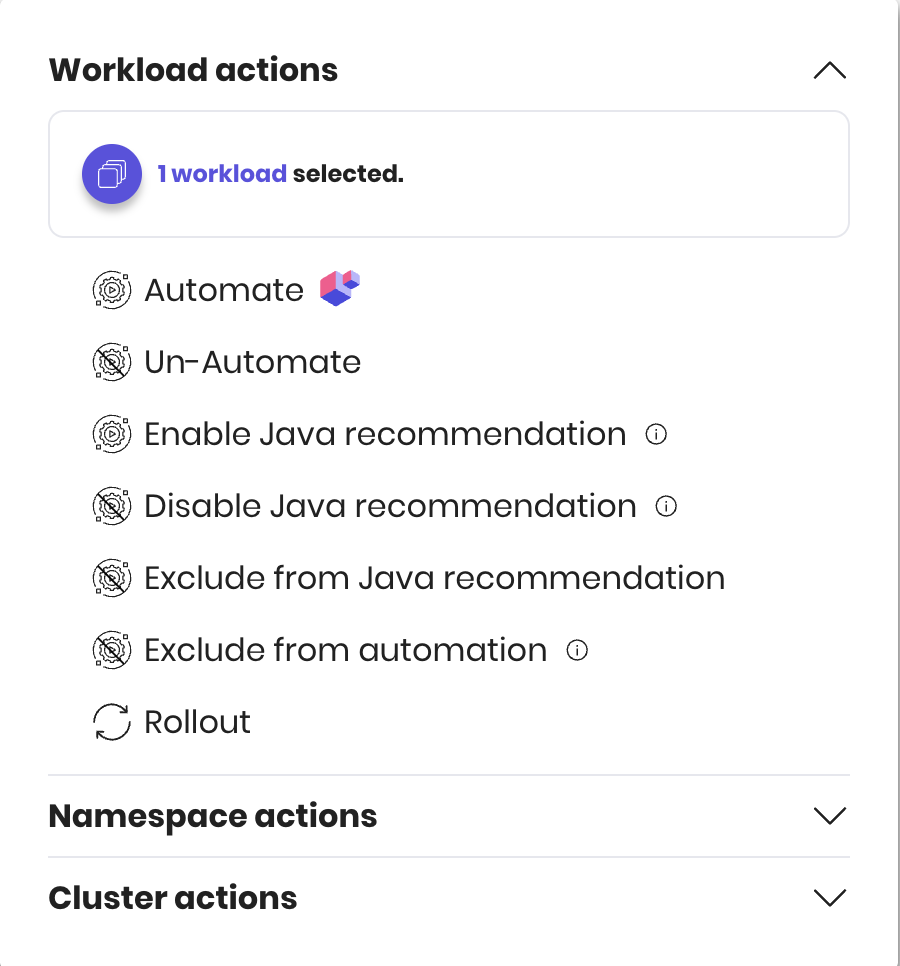
Use the UI action on a workload to exclude it from Java observability. Select workloads, click Java Actions and exclude from observability or automation.
Via GitOps (Workload Annotation)
Add the following annotation to exclude a workload from Java observability:
apiVersion: apps/v1
kind: Deployment
metadata:
  annotations:
scaleops.sh/jmx-injection-disabled: "true"Workloads that are already enabled with Java observability (and have the init container injected) will be evicted when excluded, so the injection can be removed.
Observability Healing
When Java observability is enabled, ScaleOps injects components into each pod — an init container, LD_PRELOAD, and a javaagent. ScaleOps includes a healing mechanism that monitors injected pods and automatically responds to failures.
What the healing mechanism detects
- Pod entering a crash-loop state
- Failure of the ScaleOps init container (for any reason)
- Excessive restarts during startup
- Probe failures during startup (liveness, readiness, or startup probes)
Injection behavior
First injection attempt — any failure is treated as fatal. The healing mechanism will act and ScaleOps will stop attempting to re-inject the workload.
After a successful injection — failures are treated as temporary. The healing mechanism still responds, but ScaleOps may attempt to re-inject the workload in the future.
What happens on failure
| Failure type | Behavior |
|---|---|
| Fatal | The entire workload is evicted (all associated pods) |
| Temporary Available in v1.27.5+ | Only the unhealthy pods are evicted. For example, if a single pod fails its liveness probe, only that pod is evicted — not the entire workload. |
To re-enable injection after a fatal failure, contact ScaleOps support.
Visibility of injection failures Available in v1.28.2+
From v1.28.2, injection failures are surfaced as optimization gaps in the ScaleOps UI, making it easy to identify which workloads were affected and why they are not receiving Java optimization.
Java Optimization Automation
Java workloads can be found on the Java Workloads page under Workload Rightsizing in the platform, which provides an overview of waste, savings, and workloads.
Java optimization automation uses the JVM metrics collected during the observability stage to optimize JVM configuration flags for your Java workloads.

Enabling Java Automation
Java automation can be enabled at different scopes using UI or GitOps:
Via UI
- Workload level: Use the toggle in the Java page or workload actions
- Namespace level: Use namespace-level UI actions
- Cluster level: Use cluster-level UI actions
Via GitOps
Control Java automation at different scopes:
| Scope | Method | Example |
|---|---|---|
| Workload | Annotation | scaleops.sh/default-java-auto: "true" |
| Namespace | AutomatedNamespace CRD | javaOptimize: true |
| Namespace | Annotation | scaleops.sh/default-java-auto: "true" Available in v1.33.4+ |
| Cluster | Helm values | clusterAutomation.java.optimize: true Available in v1.33.6+ |
Workload Annotation Example:
apiVersion: apps/v1
kind: Deployment
metadata:
  annotations:
    scaleops.sh/default-java-auto: "true"
Namespace CRD Example:
apiVersion: analysis.scaleops.sh/v1alpha1
kind: AutomatedNamespace
metadata:
  name: my-namespace
  namespace: my-namespace
spec:
  javaOptimize: true
Namespace Annotation Example: Available in v1.33.4+
apiVersion: v1
kind: Namespace
metadata:
  annotations:
    scaleops.sh/default-java-auto: "true"
Cluster Helm Values Example: Available in v1.33.6+
clusterAutomation:
  java:
optimize: trueUI actions take precedence over annotations. A UI action on a workload permanently disables the annotation’s effect for that workload.
What Gets Optimized
ScaleOps optimizes JVM configuration flags (including heap parameters) based on actual JVM behavior and usage patterns. It does not change container resource requests - Workload Rightsizing will naturally reduce memory recommendations as usage patterns change after optimization.
Spark Workloads Available in v1.26.14+
ScaleOps Java Optimization supports Spark Executors, enabling you to optimize memory allocation and JVM heap configuration for Spark executor pods. This helps reduce overprovisioning and improve resource efficiency across your Spark workloads.
Notes:
- Spark Drivers are not currently supported for Java optimization.
Enable via Helm
Java observability can be enabled via Helm configuration:
Observability
- Set
clusterAutomation.java.recommendation.enabled=trueto enable cluster-wide JVM metrics visibility Available in v1.33.4+ - On versions earlier than v1.33.4, set
java.observability.enabled=trueinstead. This value continues to work on newer versions for backward compatibility.
For cluster automation using Helm values (including Java options), see Cluster Actions.
Private Image Registry
- Follow the Private Image Registry instructions to configure access to your private registry for the JMX injector image.
- Set
injectors.imagePullSecretCreation.enabled=trueto automatically create imagePullSecrets in the workload namespace when using a private registry (default:false).
Prerequisites
Observability Requirements
- Workload Type: Flink workloads are not supported (neither observability nor optimization)
- JDK Version: JDK 8+ required
Optimization Requirements
Observability requirements plus:
- JDK Version: JDK 9+ required
- GC Type: G1 Garbage Collector required