Un-Evictable
Understanding Un-Evictable Workloads
In Kubernetes clusters, un-evictable workloads are critical applications that the cluster autoscaler cannot evict during scale-down. These are typically databases, messaging systems, or other stateful applications crucial for data consistency and reliability. Ensuring the uninterrupted operation of these workloads is essential to maintain data integrity, meet performance expectations, and adhere to service level agreements (SLAs).
Un-evictable workloads are often safeguarded using mechanisms such as Pod Disruption Budgets (PDBs) and annotations like cluster-autoscaler.kubernetes.io/safe-to-evict: "false", karpenter.sh/do-not-evict: "true" and more.
Impact on Cluster Scaling and Costs
The Cluster Autoscaler avoids scaling down nodes that host un-evictable workloads, even if those nodes are significantly underutilized. This restriction can result in suboptimal resource utilization and higher operational costs, as nodes must remain active solely to accommodate these workloads, limiting overall cluster efficiency.
How ScaleOps Helps

ScaleOps addresses un-evictable workloads with the Pod Placement feature, which bin-packs their pods onto fewer nodes. This optimized placement unblocks nodes from scaling down, cuts operational costs, and enhances cluster efficiency.
Technically, ScaleOps leverages Kubernetes preferred pod and node affinity to maintain optimal placement of identified un-evictable workloads. This approach ensures that predefined constraints, such as node selectors, pod and node affinity, anti-affinity, taints, and other scheduling rules, are respected.
To achieve this, ScaleOps applies the labels scaleops.sh/node-packing and scaleops.sh/managed-unevictable to nodes and pods, to enforce the desired placement of un-evictable workloads.
Key Features
On the Pod Placement Page, you can explore potential savings from automating these workloads, view how many nodes are blocked from scale-down and explore effective action items.
Automatic Bin-Packing: ScaleOps identifies un-evictable workloads and optimizes their pod placement to maximize resource utilization, minimizing the number of nodes blocked from scaling down.
Types of Unevictable Workloads
-
Unevictable workloads: Workloads protected by a PodDisruptionBudget or annotations that prevent node scale-down.
-
Pods without owner: Standalone pods lacking an owner reference (e.g., a ReplicaSet).
-
Un-ready workloads: Workloads whose pods remain un-ready for extended periods (due to availability issues).
-
Kube-system workloads: Workloads in
kube-systemthat run critical cluster services, often with high-priority classes, and may be deployed as static pods.
kube-system workload bin-packing requires the ScaleOps mutating webhook to intercept pods in the kube-system namespace, even if the namespace is ignored. Cloud provider consoles (e.g., GKE) may show warnings about this - these can be safely disregarded.
- Workloads with local storage: Workloads whose pods use node-local storage (data stored directly on the node where they are scheduled).
The Pod Placement page
Navigate to Core Infra → Pod Placement (/unevictable).
The page is organized top to bottom:
- Summary metrics — monthly cost, wasted spend, blocked nodes broken down by reason, and automation coverage across workloads.
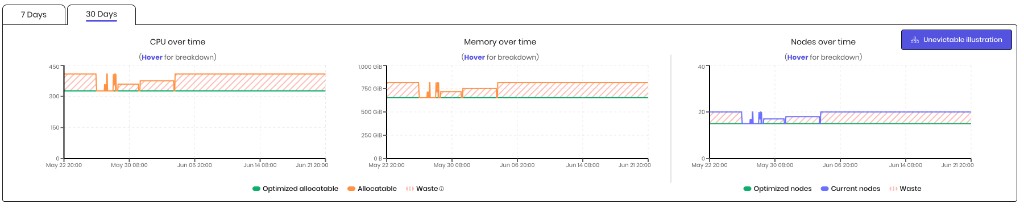
- Resource graphs — CPU, memory, and nodes over time.
- Category actions — per-type automation toggles and rollout controls.
- Workloads and blocked nodes tables — every affected workload and node, with filters and bulk actions.
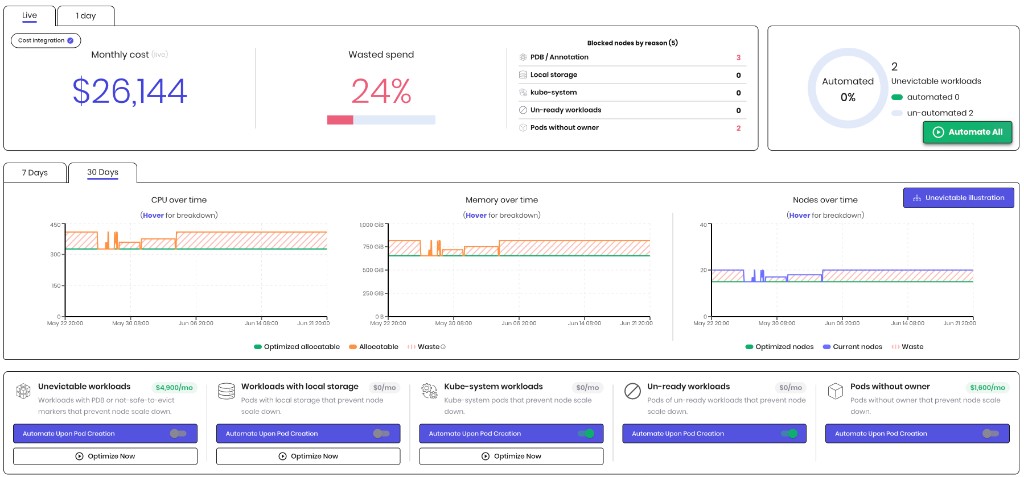
Summary metrics
The top section shows Live and 1 day views.
| Metric | Description |
|---|---|
| Monthly cost | Total monthly cost of nodes in the cluster. |
| Wasted spend | Percentage of node cost blocked by un-evictable workloads that could be consolidated. |
| Blocked nodes by reason | Count of blocked nodes per category: PDB / annotation, ownerless, un-ready, kube-system, and local storage. |
| Automated | Share of un-evictable workloads (not individual pods) that have automation enabled. |

Use Automate All (bottom-right of the automation donut) to enable automation for all eligible workload categories at once.
Resource graphs
Two time-range tabs — 7 Days and 30 Days — show:
- Nodes — current nodes vs. optimized nodes over time.
- CPU and Memory — allocatable resources and waste broken down by blocking reason.
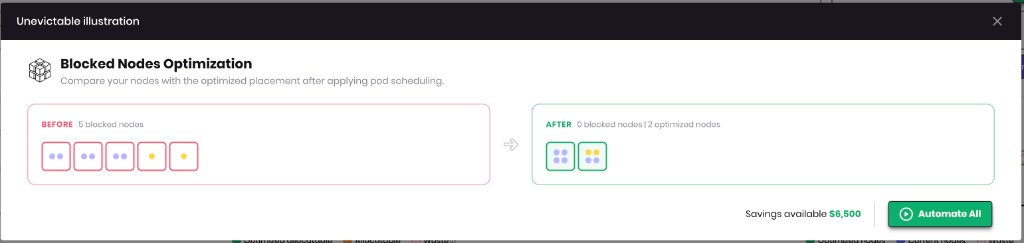
Click Unevictable illustration to open a before/after view of how bin-packing consolidates workloads across nodes.
Category actions
Each workload type above appears as a card in the category actions bar. Each card shows the monthly savings available for that category and two controls:
- Automate Upon Pod Creation — workloads in this category are bin-packed automatically when new pods are created.
- Optimize Now — immediately apply bin-packing to existing workloads (available for unevictable, kube-system, and local-storage categories).

Workloads table
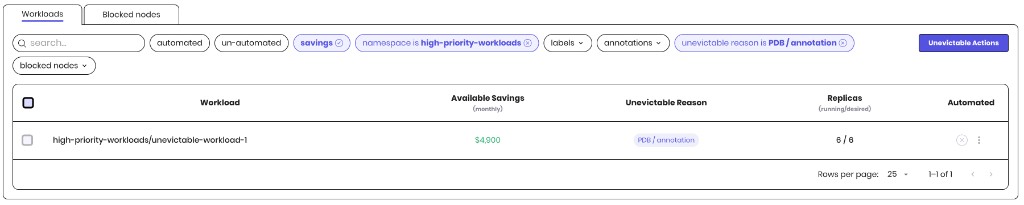
The Workloads tab lists every workload that blocks node scale-down.
| Column | Description |
|---|---|
| Workload | Namespace and workload name. A green check indicates the workload is fully optimized; an info icon means a rollout is still required. |
| Available Savings | Estimated monthly savings once the workload is bin-packed. |
| Unevictable reason | One or more reason chips (PDB, ownerless, un-ready, kube-system, local storage). |
| Replicas | Running / desired replica count. |
| Automated | Whether automation is enabled for the workload. |
Click a row to open the Workload overview.

Filters
Use the filter menu to narrow the table by automation state, savings, namespace, labels, annotations, un-evictable reason, and blocked node.
Bulk rollout
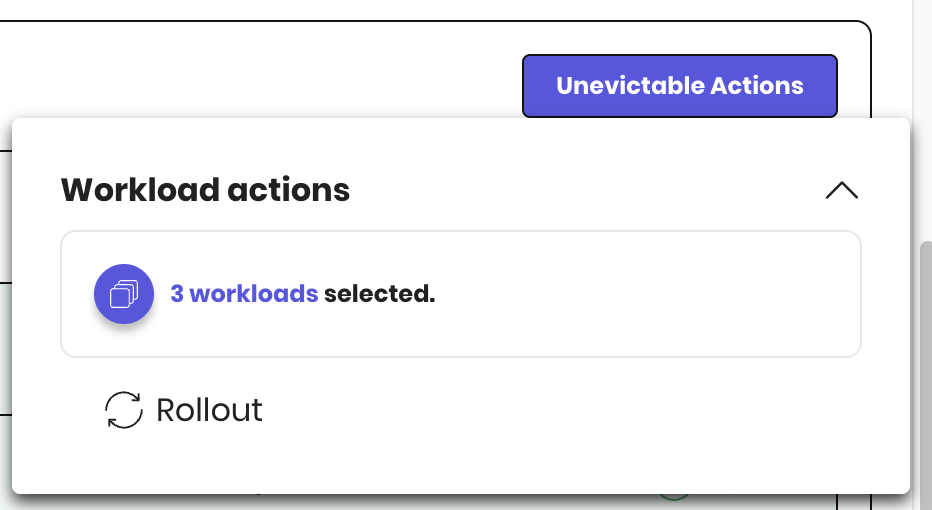
Select multiple workloads and use the Unevictable Actions menu to choose Rollout on all eligible selections at once. Ownerless and un-ready workloads are skipped automatically.
Blocked nodes tab
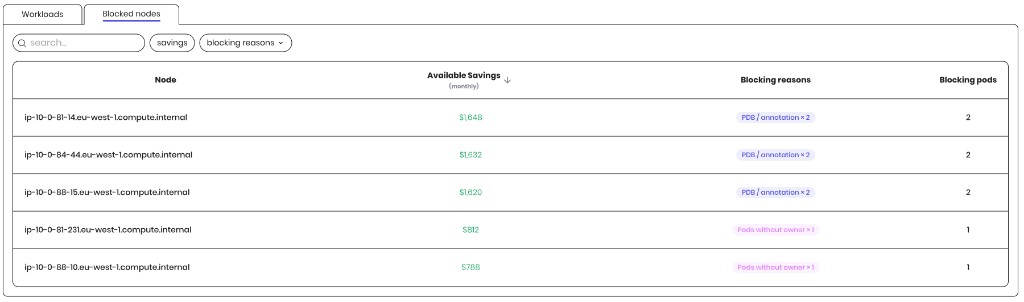
Switch to the Blocked nodes tab to see every node that hosts blocking workloads.
| Column | Description |
|---|---|
| Node | Node name (click to open the node overview). |
| Available Savings | Monthly savings if the node becomes eligible for scale-down. |
| Blocking reasons | Reason chips for blocking workloads on the node. |
| Blocking pods | Count of blocking pods on the node. |
Policy-based automation
Policy-Based Feature: Bin-packing for un-evictable workloads is enabled by default in ScaleOps policies, ensuring cost reduction to relevant workloads without manual intervention or disruptions.

Note: Workloads are bin-packed upon pod creation when automation is enabled. You can click the Optimize Now buttons to immediately apply a rollout.
Simple Workload Detection and Automation: ScaleOps provides a straightforward way to identify un-evictable workloads using its built-in filter called “unevictable.” Upon automation these workloads will be optimized and bin-packed by ScaleOps.

By leveraging ScaleOps, users can efficiently manage un-evictable workloads in their Kubernetes clusters, improve resource utilization, and lower operational costs.
Related
- Pod Scheduling — relax self anti-affinity constraints to unblock additional nodes.
- Node Management — how ScaleOps consolidates and scales down nodes once they are unblocked.